
Nintendo Switch Sports Resort mouse controls: How Joy-Con 2 Mouse Mode Works in Skateboarding
✓ Last verified 2026-10-21 · How we check facts
Quick answer
Mouse controls in Nintendo Switch Sports Resort use the Joy-Con 2 as a mouse for skateboarding, with pulling back to push and flicking to perform tricks. Multiplayer skateboarding needs extra Joy-Con 2 controllers, according to one review.
Nintendo Switch Sports Resort mouse controls are used in skateboarding, and Nintendo says the Joy-Con 2 works as a mouse in that sport. You can grind rails, slide and do aerial tricks, according to Nintendo's pre-launch article. The game releases on October 22, 2026, exclusively for Nintendo Switch 2.
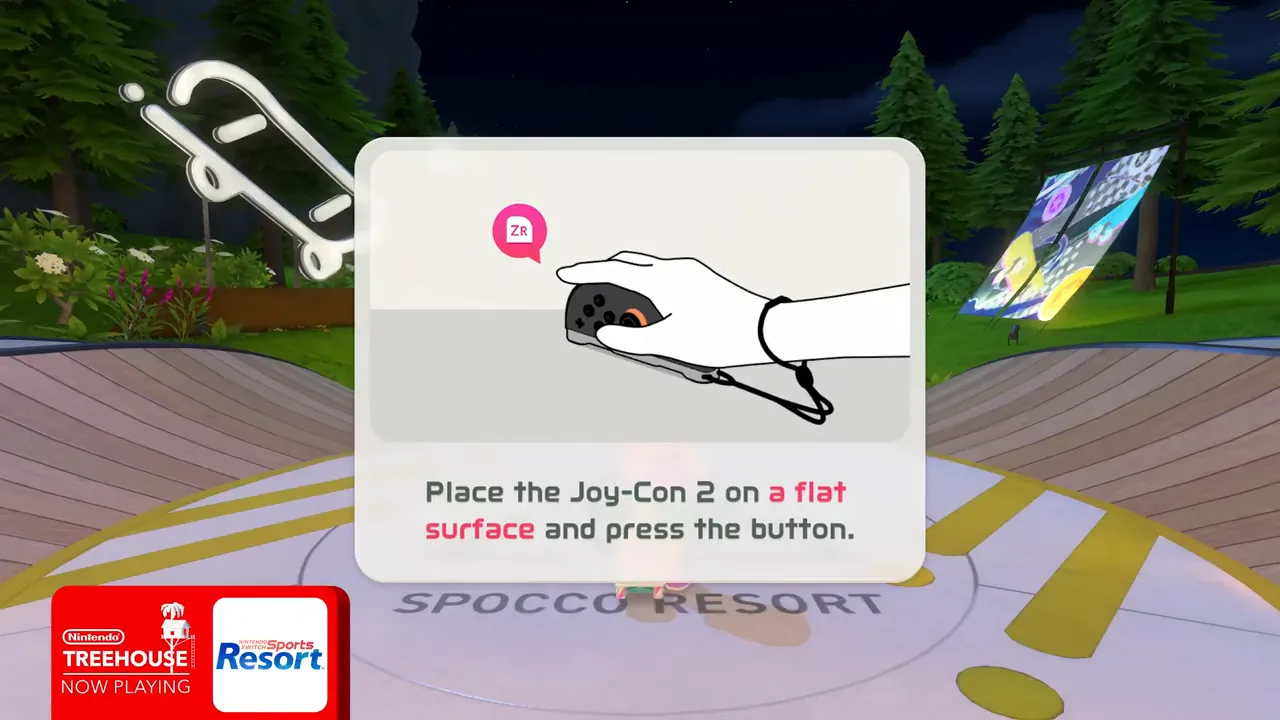 Image: Nintendo.
Readers new to Nintendo Switch Sports Resort mouse controls usually want the basic motions first, so those come first below. This guide covers the motions shown in previews, what Nintendo says, and what one review adds about extra controllers. For the other sports, the controls overview lists each one.
Nintendo Switch Sports Resort mouse controls for Skateboarding
Previews describe two basic motions. Pulling the Joy-Con 2 back across a surface mimics pushing, and flicking it performs tricks. Nintendo adds grinding rails, sliding and aerial tricks to the skateboarding list.
| Action | How it works | Basis |
|---|---|---|
| Push | Pull the Joy-Con 2 back across a surface | Previews |
| Trick | Flick the Joy-Con 2 | Previews and a review build |
| Grind and slide | Grind rails and slide, as Nintendo describes | Nintendo |
| Aerial tricks | Perform aerial tricks | Nintendo |
The two motions are described in more than one source, and the sources agree on the basic pattern. The sources checked do not list every trick, so this guide does not invent a trick list or any scoring for each one. Nintendo's wording on grinding rails, sliding and aerial tricks is the official part of the skateboarding description.
Skateboarding Tours and Controllers
Skateboarding is one of three leisure sports with a sightseeing tour mode, and previews show this in more than one video. One review reports that wheels are collectibles that can be traded for Spocco Points, so the tour and the Nintendo Switch Sports Resort mouse controls work together. The tour rules are on the sightseeing tour guide. Spocco Photos are the collectible that tours are built around, and that guide explains how they fit in.
Controllers, Players and Tabletop Limits
Nintendo's pages say multiplayer requires one compatible controller per player. One review says that playing skateboarding with two or more friends needs additional Joy-Con 2 controllers, and it adds that local co-op cannot be played in tabletop mode. The same review notes that mouse-mode skateboarding needs a spare Joy-Con 2.
| Setup | What you need | Basis |
|---|---|---|
| One player | One Joy-Con 2 used as a mouse | Nintendo and previews |
| Two or more players | Additional Joy-Con 2 controllers | One review |
| Tabletop mode | Local co-op cannot be played | One review |
The skateboarding tour is part of the island, so the Wuhu Island hub explains where the tour sits within the wider game. The setup table above shows what each group size needs. A single player needs one Joy-Con 2, while a group needs one per person, according to the same pages.
Common Mistakes With Mouse Controls
| Mistake | Better approach |
|---|---|
| Planning a friends session with one controller | Bring one Joy-Con 2 per player |
| Expecting local co-op in tabletop mode | Plan local games for TV mode |
| Treating the controller like a stick | Pull back to push and flick to trick |
Most of these mistakes come down to controller count, so check that before the first session.
The archery wind guide and the bowling spin guide cover two other sports that depend on the motion of the controller.
Frequently Asked Questions
Q: Do I need a separate mouse for Nintendo Switch Sports Resort mouse controls?
No. Nintendo says the Joy-Con 2 is used as a mouse in skateboarding, so the controller itself works as the mouse.
Q: Can I skateboard with friends using mouse controls?
Yes, but one review says two or more friends need additional Joy-Con 2 controllers. Multiplayer needs one compatible controller per player.
Q: Do mouse controls work with a Pro Controller?
Pro Controller support has not been announced, and Nintendo's pages do not mention it.
Q: Which sport uses Joy-Con 2 Mouse mode?
The sources checked link Joy-Con 2 Mouse mode to skateboarding, and they do not name another sport for it.
Q: Does the skateboarding tour need online play?
Offline tours do not need a membership. Online sessions need a paid Nintendo Switch Online membership, and sources differ on whether leisure sports can be played online.
Continue exploring
Sports →
Nintendo Switch Sports Resort skateboarding: controls, tricks and tips
Nintendo Switch Sports Resort skateboarding explained: mouse-mode Joy-Con 2 controls, grinds and tricks, player counts, and sightseeing tour details before launch.
Guide →
Nintendo Switch Sports Resort Beginner Guide: Setup, 12 Sports and Where to Start
New to Nintendo Switch Sports Resort? Read the setup needs, the 12 sports, the main modes and where to start before the October 22, 2026 release.
Island →
Nintendo Switch Sports Resort sightseeing tour: Modes, Collectibles and Co-op Explained
Nintendo Switch Sports Resort sightseeing tour explained: the three leisure sport tours, Spocco Photos, shared co-op collecting and online questions.
Related Guides
Up next →
Nintendo Switch Sports Resort archery wind: How Wind Changes Your Arrow Shots
Nintendo Switch Sports Resort archery wind explained: how wind direction changes between shots, how Joy-Con 2 aiming works and the archery mode options.
Bowling Spin Guide
Nintendo Switch Sports Resort bowling spin explained: how twisting the Joy-Con 2 adds curve, why holding the controller matters and bowling player counts.
Controls Guide
Nintendo Switch Sports Resort controls explained: Joy-Con 2 basics, Mouse mode, sport-by-sport motions and what Nintendo says about Pro Controller support.